'idle' 'sensor.now_playing': Got state
The Music Remote
The little AtomS3R on my sideboard shows what's playing. I'm turning it into a battery-powered remote: twist for volume, flick to skip, face down to pause, and fast asleep the rest of the time on 200 mAh. Most of it works. This post follows the rest of the build, dead ends included, along with the bits I'd rather blame on solar flares.
In progress · about 96 %: v1.1.0 is on the remote, with themes; left: the hold to take the music along, and a day of real use
TL;DR
- An AtomS3R (a 24 mm cube with a screen, a button and a motion sensor) sits on a 200 mAh battery base and becomes a remote for whichever speaker Home Assistant has selected.
- Twist it for volume, flick it to skip, turn it face down to pause. A double press flips through four screens: now playing, the queue, the speaker picker, and system info (that one's for me, not you).
- It sleeps after 30 seconds of neglect and wakes when you pick it up, ready in about two and a half seconds. That's faster than most helpdesks pick up the phone.
- A charge gives about 2 hours 10 minutes of screen-on time, spread over however long it naps in between. There's no fuel gauge, so the battery percentage comes from a curve I measured the old-fashioned way, by running it flat. On the charger it works out that it's charging and stays awake, even when it's plugged in while asleep.
- Getting it to wake up took about ten firmware builds. The suspects: a button wired to a pin that can't wake anything, four bits I didn't know existed, and a pin that lies after waking up. None of it was user error. Allegedly.
- Still to do: confirming the sleep side of the charging rules on battery, and trying the "take the music along" hold.
What it is
For a while now, the AtomS3R has lived on my sideboard as a ticker: plugged into USB, scrolling "Artist – Title" for the selected speaker, with one button for play/pause. Nice to glance at, but useless as a remote, unless your idea of a remote involves walking over to the sideboard. So: a battery base underneath, a few gestures, a few more screens, and the hard part, teaching it to sleep. Anyone who has ever been on call knows sleep is the hard part.
The cast
- The remoteAtomS3R, ESPHome
- An ESP32-S3 with a 0.85" ST7735 screen, an LP5562 driving its backlight, a BMI270 motion sensor and one button. Named
atoms3r, which is what it is, and called the Music remote in the glossary, which is what it does. Smaller than most of the excuses in this post. - The batteryAtomic Battery Base, 200 mAh
- Snaps under the Atom, charges over USB-C, and has a DIP switch that doubles as an off switch, because why have two controls when one can be confusing. It puts the battery voltage on GPIO8 through a divider, so the remote can at least see its own charge.
- Home Assistant1 dropdown, 1 blueprint
- The same dropdown as The Vinyl Remote holds the selected speaker, so the record stand and the remote always agree on where the music goes. No fights over the speaker, at least not between devices. A blueprint turns the remote's events into player actions.
- Music Assistantplayers and queues
- Plays the music and knows the queue. Home Assistant's
get_queueaction says which track it's on, and Music Assistant's own API lists what comes after it, which Home Assistant can't. It also wants a token, and it judges your punctuation (see below).
Four screens, and two more
A double press cycles the views. Leave it on the Queue or Player view for 15 seconds and it wanders back to Now playing by itself. The System view stays put, because that one's for debugging, and it keeps the remote awake for five minutes instead of 30 seconds: diagnosing a device that falls asleep mid-sentence gets old fast. Wi-Fi bars and the battery percentage sit in the corner of every view ("chg" or "full" on the charger), and a volume bar pops up while the volume changes.
The System view's fw line tells you which build is running: the git commit it was built from, or its tag, like v1.1.0, with -dirty when I've flashed something I haven't committed yet. It's a confession, basically. A firmware update now takes over the screen too, with a progress bar and then "restarting". Before that, an update looked exactly like a remote that had frozen, and "it's not broken, it's updating" is an excuse I'd rather make on purpose.
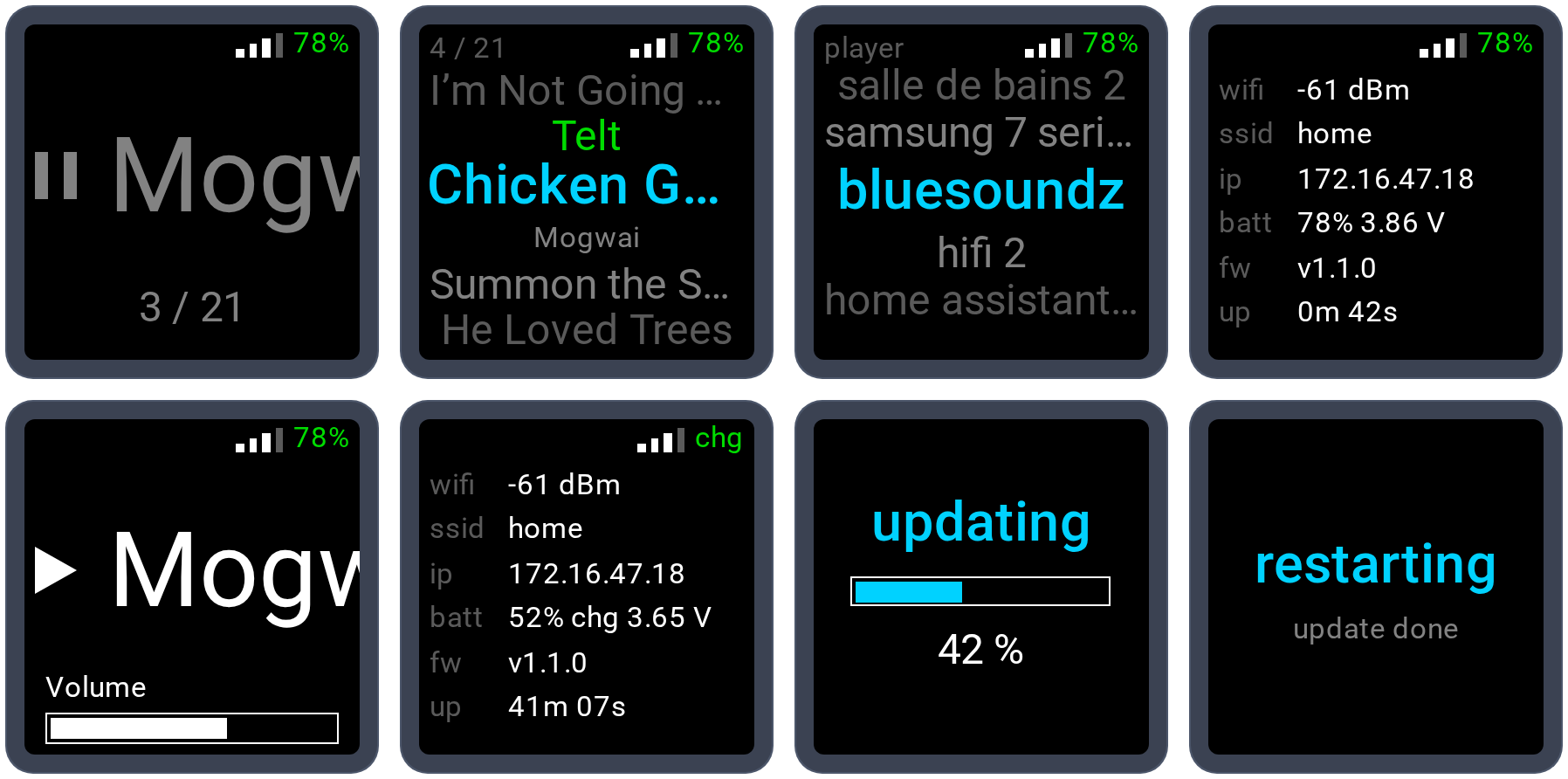
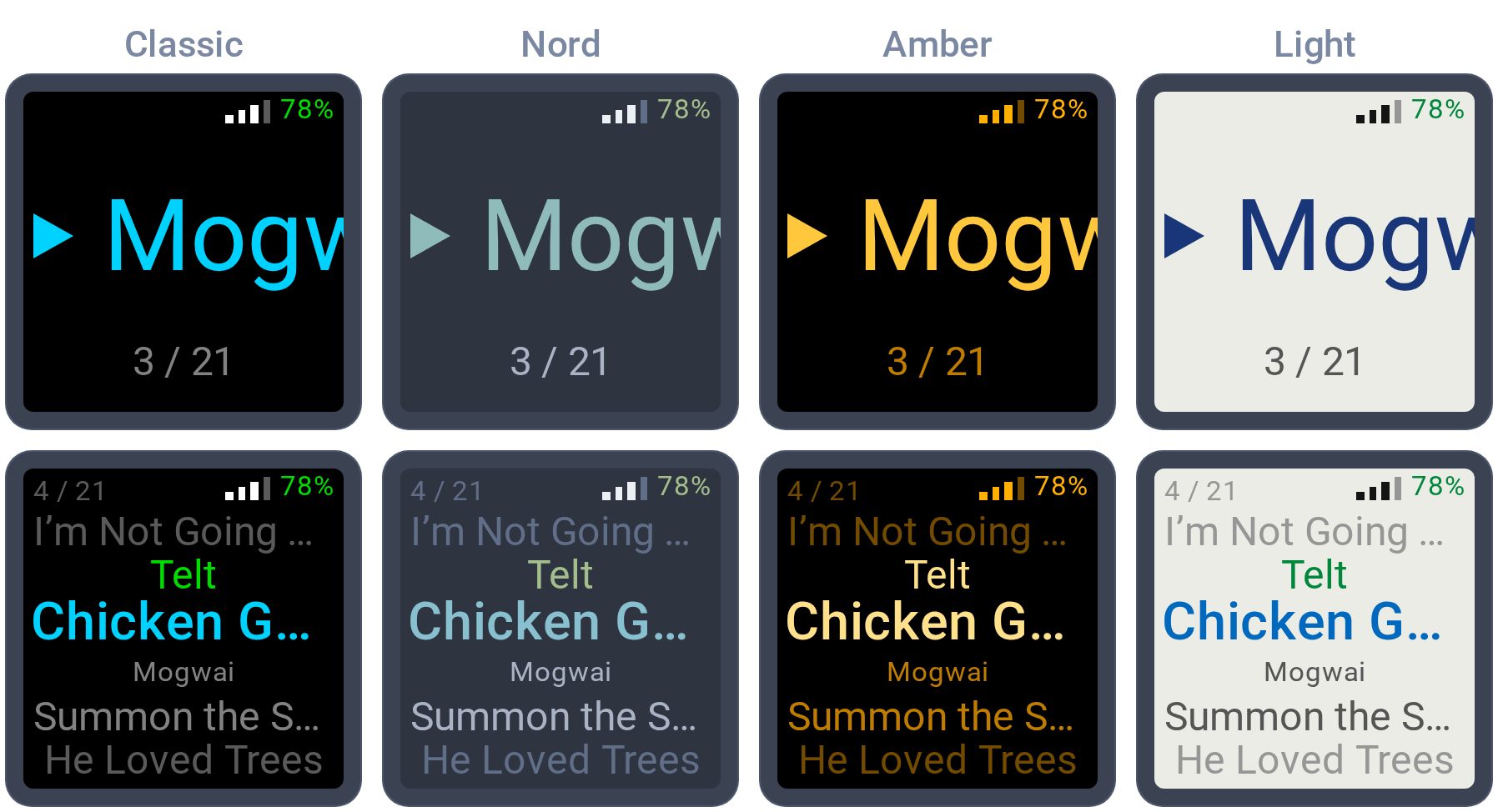
The colours come from a theme, picked from a dropdown in Home Assistant: Classic (black, with the cyan ticker), Nord (this blog's palette), Amber (an old terminal, for the nostalgic operator) and Light (for people who answer email before coffee). Every colour on the screen plays one of eleven roles: the background, the text, the ticker playing and paused, two greys, the highlight, the song playing, and green, amber and red for the corner and the warnings. A theme sets all eleven, so switching themes repaints the whole screen without touching a single layout. The choice survives deep sleep, and an automation can change it, for a darker screen at night.
Twist, flick, flip
The motion sensor is on whenever the remote is awake, so every gesture has to be something nobody does by accident. Picking it up does nothing except wake it. Waving it around while explaining something also does nothing, which I have tested extensively, mostly without meaning to.
| Move | Does |
|---|---|
| Twist, like a knob | Volume, following how far you turn |
| Flick right / left | Next / previous track (on the Player view: move the highlight) |
| Tilt and hold | On the Queue and Player views: scroll, one item at a time, every 0.4 s |
| Shake | On the Queue view: reshuffle the queue |
| Face down for 1 s | Pause |
| Single press | Play/pause (on the Queue view: play the highlighted song; on the Player view: switch speaker, pause the old one) |
| Double press | Next view |
| Hold for 2 s | Sleep now (on the Player view: take the music along; built, not tried yet) |
Who decides what a flick means
Every device in the house reports what happened, and Home Assistant decides what it means: the record stand says "tag scanned", HA plays the album. Devices report, HA rules. It's a strict chain of command, like any well-run operations team, or at least like the org chart says. The remote follows that rule for everything it does, and breaks it only for what it needs to ask: the queue. So commands go out as events, questions go out as actions, because only an action gets an answer back. Events are like tickets: fire and forget.
Volume goes out as the level it should end up at (level: 0.42, not "+5 %"), at most four times a second, and the automation keeps only the latest. A slow Home Assistant can make the volume late, but never louder than asked. Nobody's speakers get blown on my watch, unless I mean it.
Where it hurt
Deep sleep: ten builds of a dark cube
The plan was simple: sleep, and press the button to wake. The button is on GPIO41. On this chip, only GPIOs 0 to 21 can wake it from deep sleep. Whoever routed that board, I'd like a word. The motion sensor's interrupt pin, GPIO16, can wake it, though. So the remote wakes when you pick it up, as long as the sensor can be talked into shouting when it moves. ESPHome reads the sensor but can't set that up, so it's done the hard way, by writing its registers directly.
From the outside, every failure looked the same: a dark cube that stays dark. Try writing a useful bug report for that. The breakthrough was splitting the problem in two. First, can a low pin wake the chip at all?
13:58:17  test_ext0: GPIO16 level 0, sleeping with ext0 on low
13:58:23  wifi up 4555 ms after boot, wake cause EXT0 (IMU INT1 / GPIO16), reset reason 8
Yes, within a second. Second, does moving the cube pull the pin low? The sensor saw everything, pinned at its ±4 g limit, and told nobody:
monitor: GPIO16 1, INT_STATUS_0 0x00, acc  19853   2022  27054
monitor: GPIO16 1, INT_STATUS_0 0x00, acc  32715   -201  12332
The cause was four bits sharing a register with the motion threshold, which I had been cheerfully overwriting with zeros. In plain words, I had told the sensor to report motion to nobody, and it obeyed. Keeping those bits fixed it:
monitor: GPIO16 -> 0
monitor: GPIO16 0, INT_STATUS_0 0x40, acc   4855  -6985 -12129
The whole saga, with a rollback, a boot bug, a pin that lies after waking and a battery wrongly accused, is in the story below, for anyone who enjoys watching other people suffer.
The queue and one stray colon
Home Assistant only knows the next track, so the queue list comes from Music Assistant's own API, which wants a token. The first calls came back:
401 Authentication required
WWW-Authenticate: Bearer realm="Music Assistant"
The token worked fine with curl. The difference was one character in secrets.yaml: Bearer: eyJ… instead of Bearer eyJ…. As the classic diagnosis goes, the problem was located between the keyboard and the chair. It was a colon.
Ten seconds is not a remote
The first working build took well over ten seconds from pick-up to useful. For a remote, that isn't a remote, it's a waiting room. Wi-Fi was scanning every channel before connecting, and the chip was self-testing its 8 MB of RAM at every boot, like a server that runs a full memtest every time someone looks at it. Fast connect and no self-test:
before:  Wi-Fi up ~4500 ms, API connected 5400-6200 ms after boot
after:   Wi-Fi up  2158 ms, API connected 2473 ms after boot, wake cause: motion
The screen also shows the last known track straight away, from memory that survives deep sleep, and quietly updates it when Home Assistant catches up. Perceived performance: the oldest trick in the book, and it still works.
Gestures meet a hand
The first gesture build ran on guesses, plus a debug switch that logs the gyroscope. One of each gesture, then read the numbers and find out how wrong the guesses were:
twist:    gyro     5   -11  -237   (Z: the axis out of the screen)
flick:    gyro  1060  -108  -164   then -1267 on the way back (X, not the Y I'd guessed)
pick-up:  gyro   -11     4    82 … 109 … 124   (Z again, back and forth)
So: the twist sign flipped (clockwise is negative seen from above, obviously), flicks moved to X above 400 °/s with the return swing ignored, and a twist only counts from 100 °/s once it has gone 30° one way, so just handling the thing cancels out. Then a ratchet: turning back to regrip is ignored for 500 ms. At 300 it felt twitchy, like a pager at 3 a.m.
A battery with no fuel gauge
The base puts the battery voltage on one pin, and that's all the remote gets to know. No current, no percentage, no "plugged in". Strictly need-to-know, and apparently it didn't need to know. Two things made it workable anyway.
The first is in M5Stack's documentation, and for once the documentation simplifies everything: the base only charges with its switch off and USB plugged into the Atom, and only powers the Atom from the battery with the switch on. "The boost and charging states cannot occur simultaneously." Flipping the switch also restarts the remote, so it only has to work out where its power comes from once, right after it starts.
The second came from running it. One charge from empty and one run from full to flat, with the remote kept awake and logging its voltage, like an intern on the night shift:
charging:          3.42 → 4.06 V in 2 h, +3 to +8 mV/min
full, on charger:  4.04 V, flat
full, on battery:  3.97 V at the switch, never higher
on battery, awake: 3.97 → 3.33 V in 120 min, flat 10 min later
That gave the first rules: on the charger if it reads 4.00 V or more, which a battery carrying the load never reaches; otherwise go by the trend, rising or falling by at least 8 mV. They held up for about an hour, which is roughly the life expectancy of any rule that hasn't met real use yet.
First came the hole in "only once": plugging in USB doesn't restart the remote. Only the switch does, and only without USB. So a remote asleep on the table, plugged in and switched off, wakes when picked up, assumes battery, and goes back to sleep long before any trend can say otherwise. Then the dashboard below caught a slower hole: halfway through a charge, the voltage climbs about 3 mV a minute, sometimes not at all, so the trend could take ten minutes to decide, or just never. And I wanted an answer within 30 seconds of picking it up.
The fix was to stop waiting for the battery to confess, and lean on it instead. On battery, the base boosts the cell to 5 V for the remote, so any extra load on the remote pulls the cell down at once. On the charger, USB powers the remote directly and the cell doesn't even notice. And every boot comes with a free extra load: Wi-Fi starting up. A measurement build logged the voltage every 250 ms through the first 22 seconds, on battery and on the charger, both woken from sleep and powered on:
                      before Wi-Fi   2–8 s after boot (median)
on battery, 5 runs    3.608–3.690 V  −10 to −20 mV
on charger, 6 runs    3.486–3.730 V  −0.5 to +3.5 mV (+145 once: the charge started 3 s after the wake)
The first second is useless (Wi-Fi starting up dips the reading on the charger too), random dips of up to 1.5 V show up on both, and blinking the backlight for extra load only moved the cell by 4–10 mV, the size of the noise. But the median from 2 to 8 seconds sorts every single run. So now, 8 seconds after each boot or wake: −4 mV or more is the charger, −6 mV or less is the battery, and the trend only settles whatever falls in between. Every check logs its numbers, and the first ones on the new build agreed:
load check: 3.6585 V before Wi-Fi, 3.6620 V median from 2 to 8 s, +3.5 mV, 23 readings: charging
load check: 3.6380 V before Wi-Fi, 3.6240 V median from 2 to 8 s, -14.0 mV, 24 readings: on battery
load check: 3.6080 V before Wi-Fi, 3.5880 V median from 2 to 8 s, -20.0 mV, 24 readings: on battery
The same tests turned up a smaller wart: while still undecided, it had reported "Battery low" next to a percentage drifting upwards. That's the hardware version of a status page saying "all systems operational" in the middle of an outage. Now charging, level and low battery stay unknown in Home Assistant until it actually knows, which takes 8 seconds.
The battery percentage follows the measured curve instead of a straight line: a straight line had said 16 % at 3.44 V, when there was really 23 % left and a cliff just ahead. Below 3.45 V it turns red, with about 20 minutes of screen time left. The base's own four LEDs, for the record, are pessimists: they light only three for a battery my curve puts at 85 %. They'd make great project managers. On the charger, the discharge curve is useless, because the charger lifts the reading. So the percentage there comes from a second curve, stitched together from two charges (one from empty, one from part-way): how much of the 133 minutes from empty to full are done, and it only ever goes up.
Two screen bugs from day one
Both had been there since the first build, both were one setting each, and both had been staring me in the face the whole time.
- Garbage along the top and right edges. The glass shows a 128-pixel window into a slightly larger memory, and my window was one row too low and two columns too far left. The strip it never wrote kept whatever junk was in memory. ESPHome even ships a model for this exact board with the right offsets, 2 columns and 1 row. I had copied older ones, because why read the manual when someone on a forum already has.
- Cyan came out yellow. Red and blue were swapped, and nothing had given it away so far: green and grey look the same either way round. My first fix set the colour order to the value it already had, the kind of change every change board I've ever met would approve on the spot. The screen wants blue first.
Sleep, by the numbers
| Powered by | Untouched for | Then |
|---|---|---|
| Battery | 30 s | Deep sleep until picked up (a timer also wakes it every 6 h) |
| Charging | 10 min | Backlight off until moved; never sleeps |
After every restart or wake it knows which of the two it is within 8 seconds; only an unclear load check keeps it awake longer, for up to ten minutes of trend. A Stay awake switch in Home Assistant overrides both. Whether music is playing doesn't matter. The only question is whether anyone is holding it, and if nobody is, it goes to bed. I admire that.
Watching it
A remote that spends most of its life asleep can't be asked how it's doing, so everything it knows has to leave it while it's awake, through two paths the house already had:
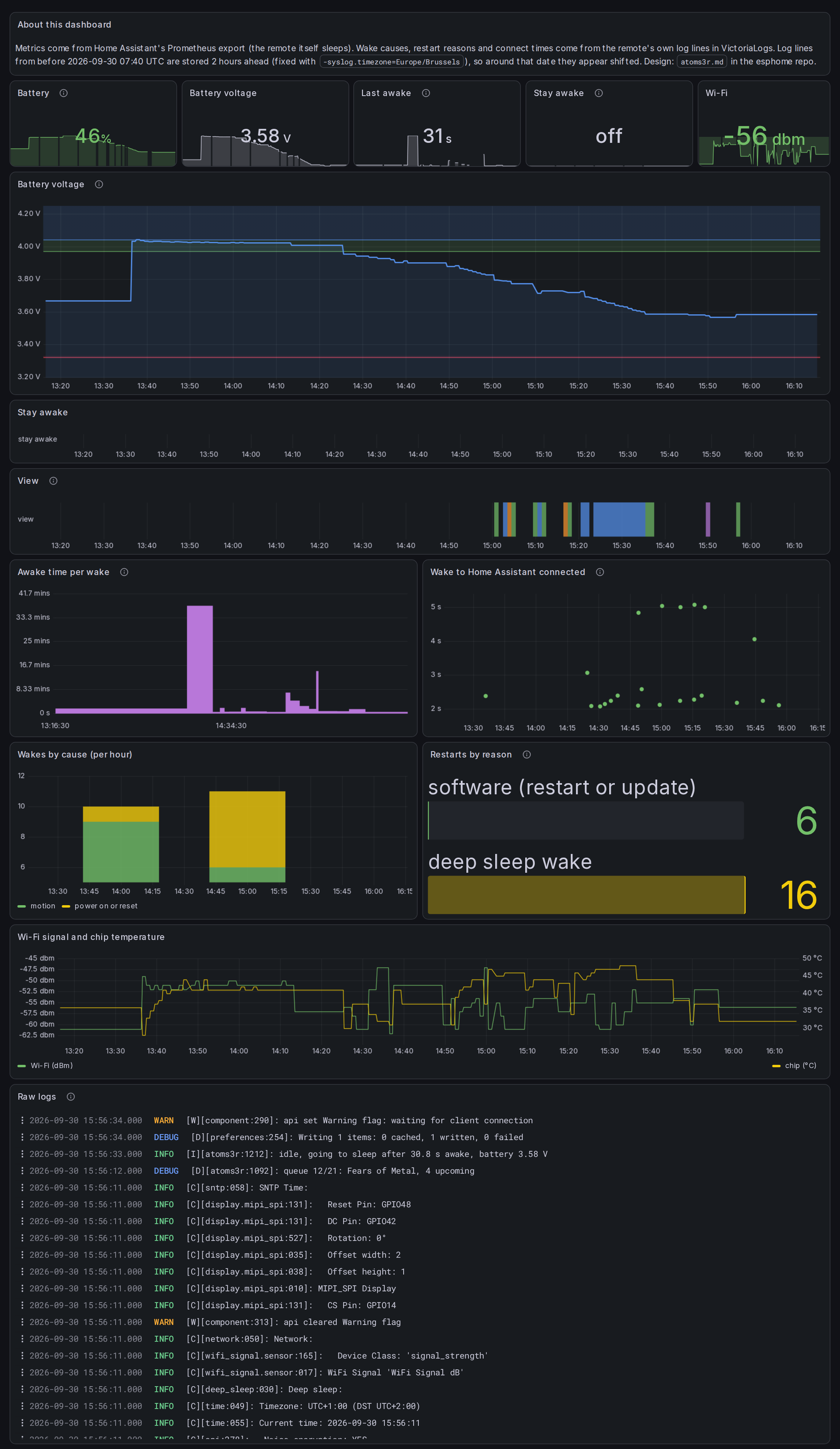
- Metrics: the battery voltage and level, Wi-Fi signal, chip temperature, Stay awake and last awake time are ordinary Home Assistant entities. Home Assistant's Prometheus export hands them to VictoriaMetrics, so the history is there even while the remote sleeps.
- Logs: every log line goes out as syslog to VictoriaLogs. The remote logs why it woke, why it last restarted, how long Home Assistant took to connect, and how long it stayed awake. The dashboard counts those lines and plots them.
A Grafana dashboard puts both side by side, with the raw log lines at the bottom and a timeline of which view the remote was showing. The calibration runs are marked on it as annotations, so anyone who doubts the curves in this post can check them against the raw data over a longer range. Doubters welcome: the logs don't lie, unlike certain pins (see below).
Where it stands
-
Wake on motion, deep sleep, and on the battery base.Done. -
Sleep and wake with battery telemetry; commands and the blueprint; the four screens and the queue list; the gestures.All four firmware slices are on the device. -
The battery: a percentage from the measured curve, a low-battery warning, charging detection, "never sleeps while charging", and the screen and the LED driver put in standby before deep sleep.Built, and checked on the device: charging or battery decided 8 seconds after each boot or wake, and sleep on battery with the new standby. Next to keep an eye on: a day of load checks, especially with the battery near full, and why the base once sat on USB without charging. -
Still on the bench: trying the hold that takes the music along, and maybe a lighter sleep for a few minutes after each use, for an instant pick-up.
The full story: logs, code and the debugging method
This part is for anyone who wants to know how a 24 mm cube can eat a whole afternoon. No prior knowledge needed. The site reliability crowd will recognise every stage of grief, and probably a few entries from the excuse calendar.
A few words first
- Deep sleep switches almost everything off. The chip keeps a tiny low-power corner awake (the "RTC domain") whose only job is to watch for a reason to wake up: a timer, or a pin changing level. The night watchman, basically.
- An interrupt is a wire the motion sensor pulls low to say "something happened". It's connected to GPIO16, one of the pins that low-power corner can watch.
- A latch means the sensor keeps the wire low until someone reads its status. Without one, the signal is a blip that's easy to miss.
- A register is one of the sensor's settings, set by writing bytes over a two-wire bus. Write the wrong bits and it does exactly what you said, which is never quite what you meant. Every operator knows the feeling, usually from the other side of the ticket.
How to debug a device that's asleep
A sleeping device can't be asked anything, and the moment it wakes it's too busy reconnecting to chat. Three things made it workable:
- Logs that leave the device. Every line goes out over the network to VictoriaLogs, so I could watch from the laptop while the cube sat dark on the table. The catch: the first line after Wi-Fi comes up sometimes vanished (it's UDP, where delivery is more of a suggestion), so the wake cause gets logged twice now.
- A throwaway prototype on its own git branch: one YAML file that does only "boot, arm the sensor, sleep, log why it woke". Fewer moving parts, fewer suspects.
- An uploader that races the device. A prototype that falls asleep 11 seconds after boot leaves very little time for an over-the-air update, and
esphome uploadspends a few of those just getting out of bed. So a small script, already running, polls the update port every 100 ms and pounces the instant it opens:
while time.() < deadline:
try:
socket.((host, 3232), timeout=0.3).()
except OSError:
time.(0.1)
continue
rc, _ = espota2.(host, 3232, None, binary, noise_psk=psk)One more trap for the site lords: the device's syslog timestamps were local time labelled as UTC, so its lines sat two hours in the future, and a query for "the last 5 minutes" found nothing at all. Logs from the future are great for excuses and useless for debugging. Explicit ranges only, until VictoriaLogs got -syslog.timezone=Europe/Brussels the morning after:
hostname:"atoms3r" _time:[2026-09-29T14:12:50Z, 2026-09-30T00:00:00Z] "wake cause"Round 1: the update that undid itself
The first prototype was flashed, and the device carried on running the old firmware as if nothing had happened. It only owned up when asked directly:
[W][safe_mode:094]: OTA rollback detected! Rolled back from partition 'app0'
[W][safe_mode:094]:  The device reset before the boot was marked successful
A new firmware only counts as good once it has run for a while. Mine reset before that, so the bootloader decided it was broken, quietly restored the previous one, and took every trace with it. Restore from backup and tell nobody: honestly, a textbook Bastard Operator move, and I couldn't even be angry. Fix: mark the image good after 10 seconds instead of 60, so a crash leaves the prototype in place to be looked at.
Round 2: a boot bug of my own
The next build armed the sensor, slept, and never woke on motion. Its own probe showed why:
probe: before, INT1_IO_CTRL 0x00, INT_LATCH 0x00, INT1_MAP_FEAT 0x00All zeros: nothing armed. A "stay awake" switch that starts off at boot triggered its "turned off, so go to sleep" action during startup, before the sensor driver had even run. The driver then reset the sensor and wiped my settings. Sabotage from the inside, by a switch I'd written myself. Sleep now only happens from the idle timer or a deliberate press.
Round 3: is the wire even connected?
The pin read low when it should have been high, so maybe the interrupt wasn't on GPIO16 at all. Instead of trusting the schematic (never trust documentation; it was written by optimists), the firmware tested it: make the sensor drive its interrupt wire low, read every free pin, drive it high, read them all again, three times over. Only one pin followed:
probe: INT1 idle LOW : 1=0 2=0 … 8=1 … 16=0 17=0 18=0 38=0 39=1
probe: INT1 idle HIGH: 1=0 2=0 … 8=1 … 16=1 17=0 18=0 38=0 39=1
probe: INT1_IO_CTRL now 0x08; pins following INT1: GPIO16
Wired correctly, then. Remember this probe: it has a second talent that only made sense much later.
Round 4: a blip, a latch, and waiting forever
Without a latch, the sensor's "movement!" is a short blip, and the chip slept right through it, like an on-call engineer with the phone on silent. With a latch, the wire stays low until read, which wakes the chip reliably and creates a brand-new trap: pick the remote up while it's falling asleep, the wire goes low, stays low, and sleep waits for it forever. So before sleeping, the firmware keeps clearing the latch until the cube has been still:
- while:
    condition:
      lambda: |-
        return gpio_get_level(GPIO_NUM_16) == 0
            && id(sleep_wait_tries) < 20;   // give up after 10 s
    then:
      - lambda: |-
          id(sleep_wait_tries)++;
          uint8_t status = 0;
          // Reading the status clears the latch
          id(imu)->read_byte(0x1C, &status);
      - delay: 500ms
Round 5: splitting the problem
By then every failure looked identical, so the only way forward was divide and conquer: test the two halves separately.
Half one: can a low pin wake the chip?
Drive the wire low on purpose and go to sleep. If waking works at all, the chip should bounce straight back:
13:58:17  test_ext0: GPIO16 level 0, sleeping with ext0 on low
13:58:23  wifi up 4555 ms after boot, wake cause EXT0 (IMU INT1 / GPIO16), reset reason 8
It did, but only when put to sleep through ESP-IDF directly. ESPHome's own sleep call "holds" the wake pin first, freezing its configuration, and nothing that went through it ever woke. I can't pin the blame on the hold for certain, because those attempts also had the bug in half two, and a good operator never blames anything without proof. Not in writing, anyway. The direct path is proven, so the firmware uses it:
// As ESPHome would: clean disconnect, fresh update marked good
App.run_safe_shutdown_hooks();
App.teardown_components(1000);
App.run_powerdown_hooks();
// Then sleep ourselves, without the pin hold
gpio_hold_dis(GPIO_NUM_16);
esp_sleep_enable_ext0_wakeup(GPIO_NUM_16, 0);          // wake on low
esp_sleep_enable_timer_wakeup(6ULL * 3600 * 1000000);  // or in 6 h
esp_deep_sleep_start();
Half two: does moving it pull the pin low?
A monitor logged the pin and the raw accelerometer twice a second while I waved the cube around like a lunatic. The sensor saw everything, all the way to its ±4 g limit. It reported nothing:
monitor: GPIO16 1, INT_STATUS_0 0x00, INTERNAL 0x01, acc  19853   2022  27054
monitor: GPIO16 1, INT_STATUS_0 0x00, INTERNAL 0x01, acc  32715   -201  12332
monitor: GPIO16 1, INT_STATUS_0 0x00, INTERNAL 0x01, acc  11587 -10259  31270
The settings read back exactly as written, which is what made it so convincing, and so infuriating:
any-motion cfg readback: 02 E0 AA 80 (wrote 02 E0 AA 80)The motion threshold shares a 16-bit word with four bits, called out_conf, that say which status bit reports the motion. The sensor's configuration file presets them; Bosch's own driver changes the threshold and leaves the rest alone. I wrote the whole word and set them to zero, which means "report motion nowhere". The sensor did exactly that, with the quiet satisfaction of a sysadmin following a badly written ticket to the letter. What it held before I touched it:
any-motion cfg as found: 05 E0 AA 3838 in the high byte is out_conf = 7, "report on bit 6". Zephyr's BMI270 driver sets that field explicitly, which is where I finally spotted it. The fix is to keep what's there:
// Word 1: threshold[10:0] | out_conf[14:11] | enable[15]
uint16_t old = page[0x0E] | (page[0x0F] << 8);  // as found: 0x38AA
uint16_t out_conf = old & 0x7800;
if (out_conf == 0) out_conf = 0x07 << 11;       // bit 6: any-motion
uint16_t thr = (threshold & 0x07FF) | out_conf | 0x8000;
And the monitor, the moment the cube moved:
monitor: GPIO16 -> 0
monitor: GPIO16 0, INT_STATUS_0 0x40, INTERNAL 0x81, acc   4855  -6985 -12129
monitor: GPIO16 -> 1
Put down, picked up, and the whole chain worked for the first time:
wifi up 4775 ms after boot, wake cause EXT0 (IMU INT1 / GPIO16), reset reason 8
API client connected 5089 ms after boot
Round 6: the battery base, suspected and cleared
The very first test ran on the battery base, and its 10-minute timer wake never came. The base's LEDs were dark. Theory: its power converter sees the tiny deep-sleep current, decides nothing is plugged in, and switches off, which would have sunk the whole plan. Every investigation needs a scapegoat, and the base was standing right there. So the test was repeated on the base, left alone for ten minutes:
14:22:27  proto: still, entering deep sleep
14:33:05  wifi up 4481 ms after boot, wake cause TIMER (fallback), reset reason 8
It woke on its own timer. The base keeps a sleeping remote powered; its LEDs just go dark when there's almost no load. The first failure belonged to an older build with the boot bug. Charges dropped, apologies issued to the battery.
Round 7: the pin that lies after waking
With the real firmware in place, the remote once came back from a pick-up with a dark screen and a working button. Half alive, the worst kind. The logs:
[W][atoms3r:212]: INT1 stuck low without motion, resetting INT1 output
[W][atoms3r:212]: INT1 stuck low without motion, resetting INT1 output
[W][script:081]: Script 'go_to_sleep' is already running! (mode: single)
It was stuck on its way to sleep, backlight already off, waiting for a wire it believed was low. The sensor swore there was no motion. The prototype had had "stuck low" moments too, and the probe from round 3 always cured them, which I had put down to its fiddling with the sensor.
The explanation that fits everything: after an ext0 wake, the chip leaves GPIO16 connected to its low-power corner, and reading it the normal way returns 0 whatever the wire is actually doing. A pin that lies. I never caught it in the act, but the fix below made the problem disappear, which in operations counts as a confession. ESP-IDF's documentation says to hand the pin back before using it. The probe had been curing it all along because, while testing every pin, it re-enabled each pin's input, GPIO16 included. The prototype mostly got away with it because ESPHome's sleep component configured that pin at boot; the real firmware doesn't use that component. Now the firmware does it on purpose, first thing at boot:
gpio_config_t io = {};
io.pin_bit_mask = 1ULL << 16;
io.mode = GPIO_MODE_INPUT;
io.pull_up_en = GPIO_PULLUP_ENABLE;
gpio_config(&io);   // also detaches the pin from the low-power domain
And a safety net: if the wire still reads low after 10 seconds of trying, the remote stays awake instead of hanging, and the backlight only goes off once it really sleeps.
Round 8: Home Assistant's own quirks
Two surprises on the Home Assistant side, for anyone writing scripts that return data, and for future me, who will have forgotten:
- A script variable holding a dictionary came back as a string:
"{'queue_id': 'up20f83b09a687', 'active': True, …}", Python's own notation, which HA doesn't turn back into a dictionary. Every field read from it was empty, silently, of course. The fix is to read the service response directly in each template, and only store plain values. - In a Jinja template,
q.itemson a dictionary is the dictionary'sitemsmethod, not the field calleditems. The queue length isq['items'].
Round 9: running it flat, on purpose
A percentage needs a curve, and a curve needs a battery run from full to empty with nothing else changing. So: charge to full, flip the Stay awake switch on in Home Assistant, unplug, and let the remote log its voltage every 10 seconds until it dies. Draining a battery to zero on purpose feels like something you'd do to the boss's laptop the night before a big presentation, but this time it was science. Home Assistant keeps the history, so the "instrument" is just a sensor and patience.
06:02  3.97 V   full, screen on, Wi-Fi up
06:45  3.69 V
07:29  3.48 V
07:59  3.33 V   the knee
08:05  3.23 V
08:09  2.94 V   last line, then silence
The run settled two things. It never restarted on the way down, so the brownouts I suspected the evening before didn't come from simply being awake on a nearly flat cell. And the firmware now logs why it last started (power-on, brownout, crash, watchdog…), so if they come back at the next empty battery, the log will say so instead of me reaching for the excuse calendar.
Round 10: what the screen does while asleep
The screen and its LED driver sit on a power rail that stays on in deep sleep, so "asleep" used to mean "backlight off, everything else idling". Now, just before sleeping, the LED driver's enable register is cleared and the screen gets its own sleep command. The display driver keeps its command writer to itself, so the firmware borrows it through a subclass that does nothing but re-export it:
using Screen = std::remove_pointer_t<decltype(id(screen))>;
struct ScreenCommands : Screen { using Screen::write_command_; };
static_cast<ScreenCommands *>(id(screen))->write_command_(0x10);  // SLPIN
Not pretty. Reaching into a driver's private parts through a subclass is the software version of borrowing the master key from the security desk "just for a minute". It's also the only thing standing between the driver and a sleep command, and both chips wake up again through their normal start-up at the next boot.
What it all cost
About ten firmware builds, one afternoon, one battery run flat on purpose, and zero multimeters. The probe from round 3 turned out to be the most useful thing I wrote all day, for reasons it kept to itself until the very end. Official root cause, for the incident report: solar flares.
This post gets updated as each step lands, including the ones that go badly. Especially those.